28 forex pairs. One ranked view.

Forex Momentum Scanner

Find the pairs in motion. Focus on the top five, see whether price is breaking out or pulling back, then use a qualifying signal candle or your own price-action method to plan the entry.

Test 4H/1H and 1H/15m workflows with all three premium indicators free for three days—no credit card required.

Momentum Scanner H1 dashboard ranking forex pairs with momentum and relative momentum columns
Automatic scanning28 forex pairs
Your starting shortlistTop 5 movers
Scan timeframes4H · 1H · 15m
Entry approachSignal bars or price action

How to use the indicator

Find the pair. Read the chart. Choose the entry.

Learn the workflow through real chart examples. The scanner identifies movement; it does not make every ranked pair an immediate trade. Screenshots are historical illustrations, not live recommendations or guaranteed outcomes.

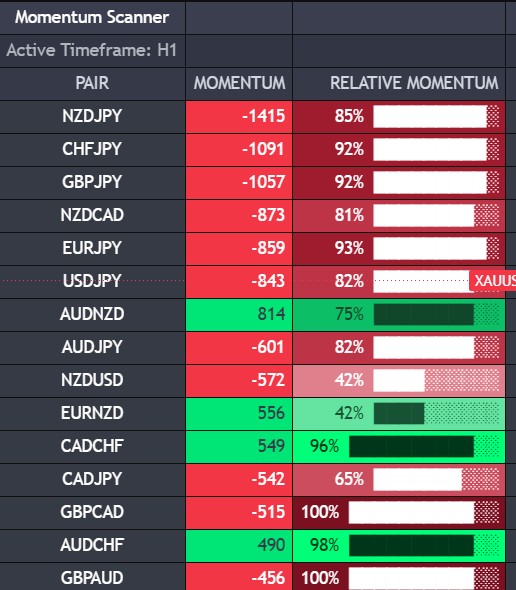
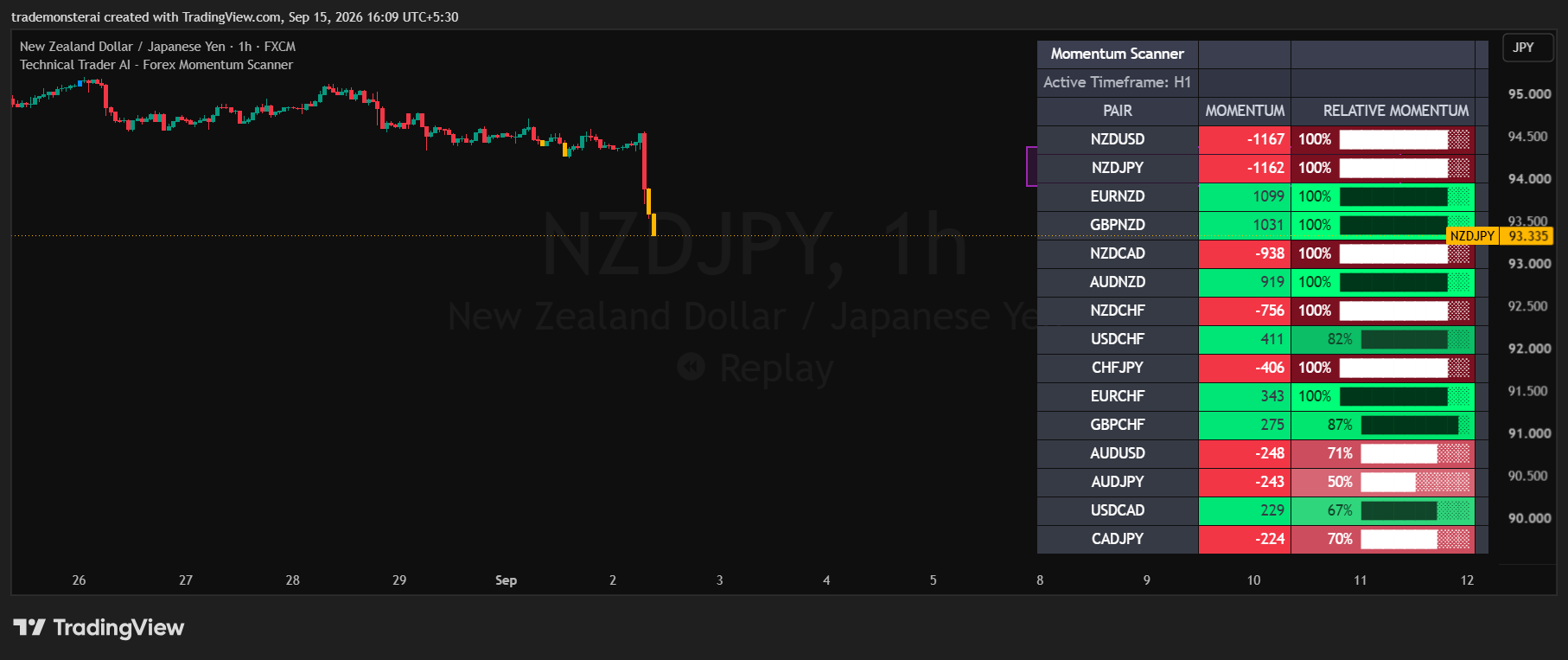
NZDJPY ranked second in an H1 forex scan with 100 percent relative momentum during a bearish breakout
01

Before the move · NZDJPY

Find the breakout setup

The forex breakout scanner automatically checks 28 pairs. Start with the top five in the ranked list, then open the chart of a pair that fits your method. No manual watchlist setup is needed.

Momentum = movement and ranking

The momentum column identifies the leading movers on the selected scan timeframe. Green is bullish; red is bearish.

Relative momentum = current location

The percentage shows proximity to the recent high for a bull move or recent low for a bear move—not the probability of a winning trade.

In this snapshot

NZDJPY is second with 100% relative momentum and yellow bearish signal bars. The full dashboard shows more pairs; focus first on your top-five shortlist.
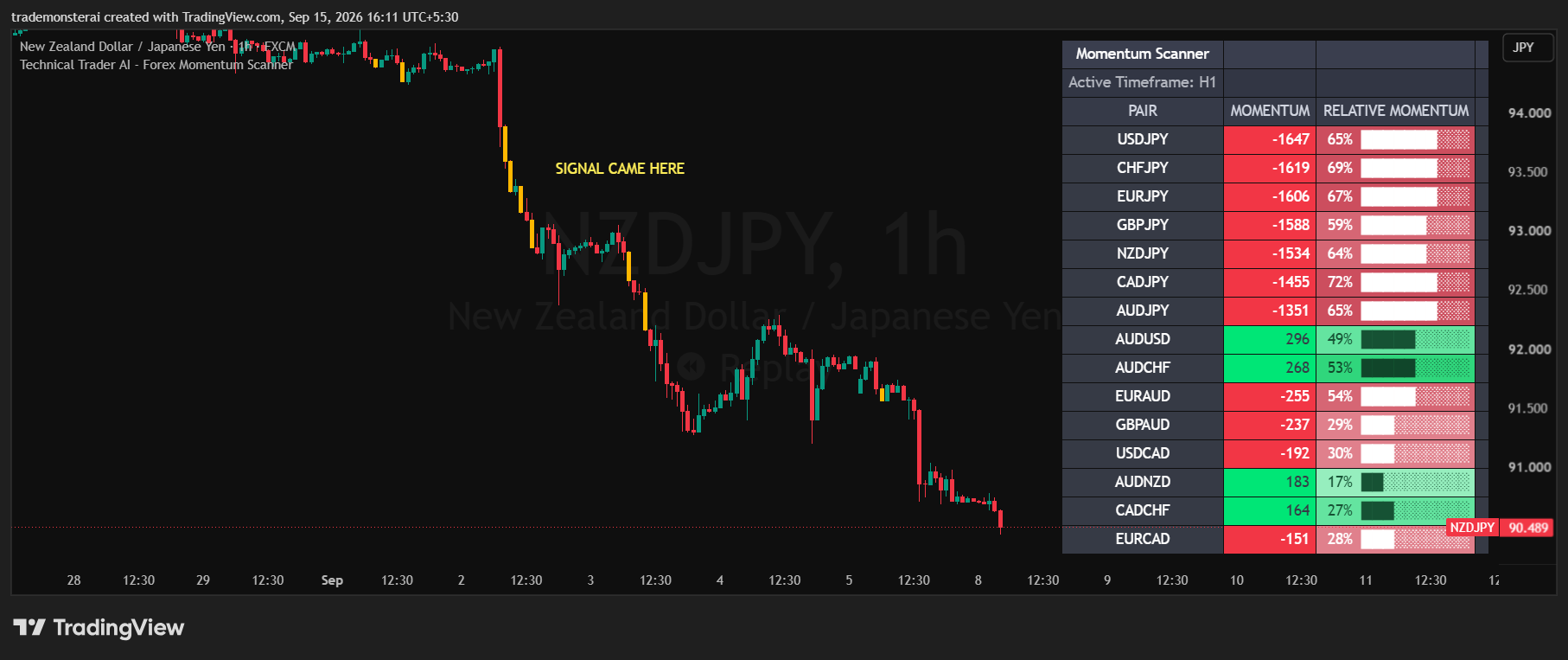
Continuation of the preceding NZDJPY example showing the move after the bearish signal and updated momentum rankings
02

After the signal · Same NZDJPY example

Follow the move after the signal

Continuing the chart above, this later NZDJPY screenshot shows what happened after the yellow bearish signal. Plan the stop and risk before entry; this historical example does not guarantee the same outcome for every signal.

Large entry candle

Use the entry candle’s low for a buy or high for a sell as the stop reference.

Small entry candle

Use the relevant swing low for a buy or swing high for a sell. Size the position for that stop distance.

Plan for 1:2 risk-to-reward

This is the suggested target framework, not a guaranteed result. If the first entry has passed, wait for a fresh setup aligned with the scan.

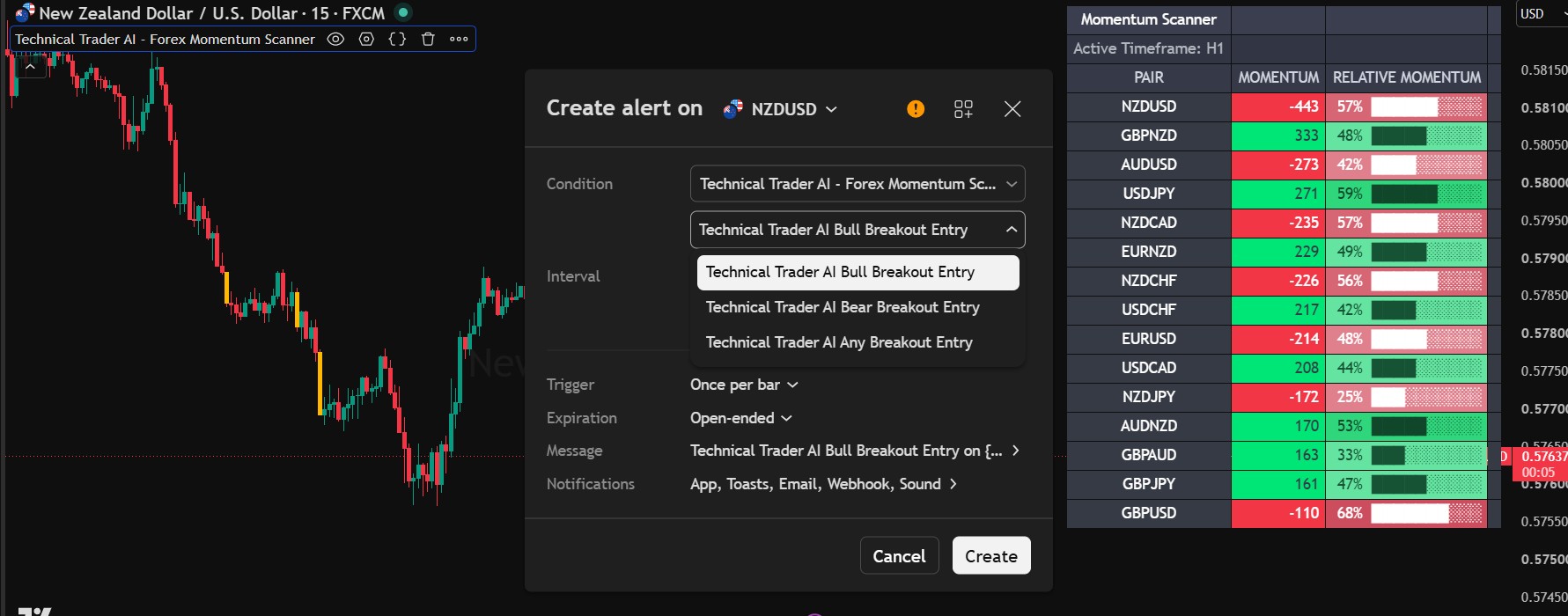
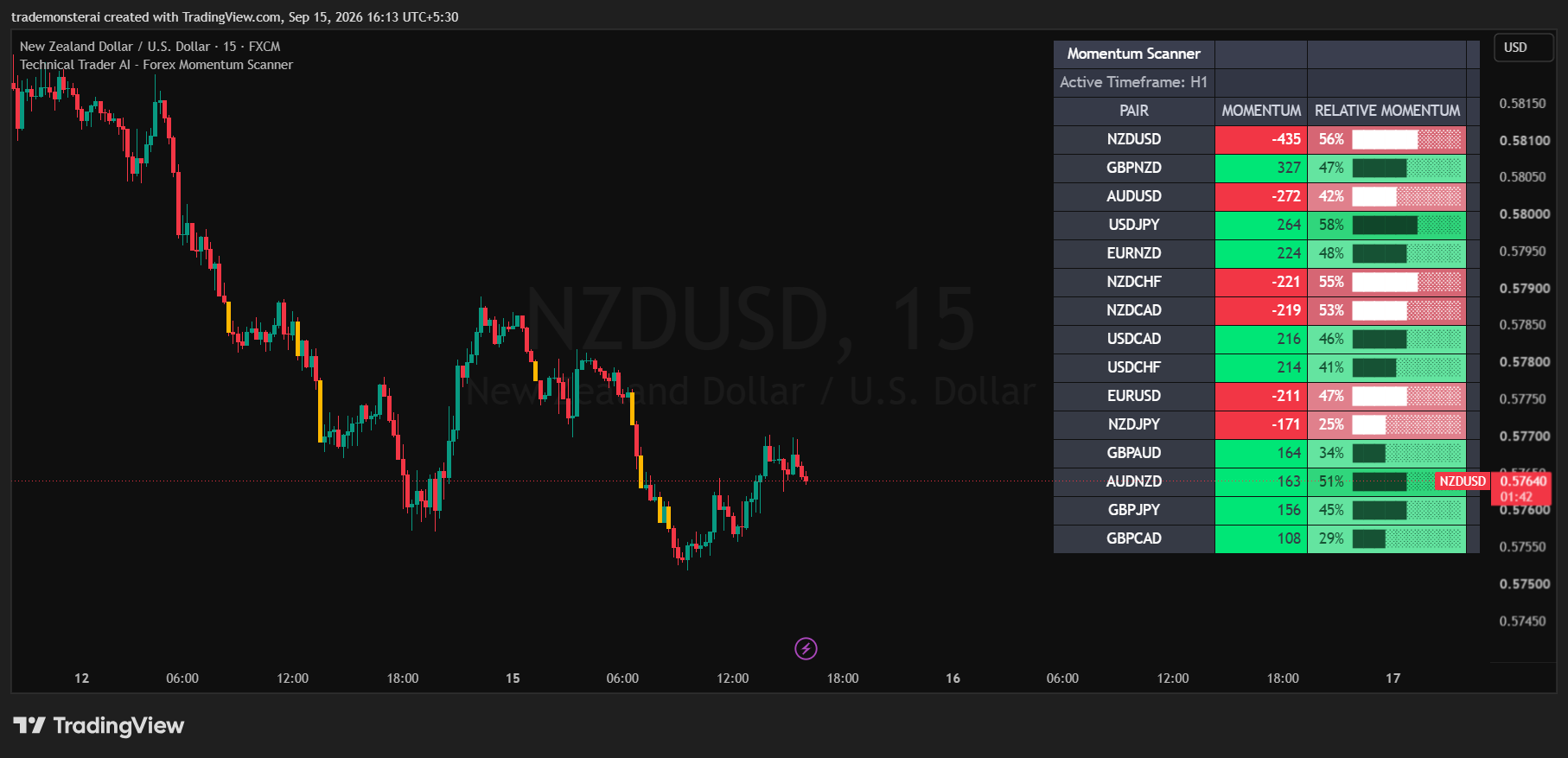
NZDUSD ranked first with minus 435 momentum and 56 percent relative momentum on an H1 scan alongside a 15-minute pullback chart
03

Rank is not an entry

Top-ranked can still mean pulling back

Here NZDUSD leads the H1 scan with momentum of −435, but its relative momentum is 56%. It has made the strongest bearish move in this snapshot while current price has pulled away from the recent low. The chart itself is 15 minutes.

Above 70%

Generally stronger trending conditions and closer to the directional extreme. Near the recent high or low, look for breakout context.

Below 50%

Avoid an immediate entry in the suggested workflow. Wait for a fresh setup rather than trading the ranking alone.

During a pullback

Keep the pair on your radar. Use its chart and a pair-specific signal alert to watch for a new opportunity.

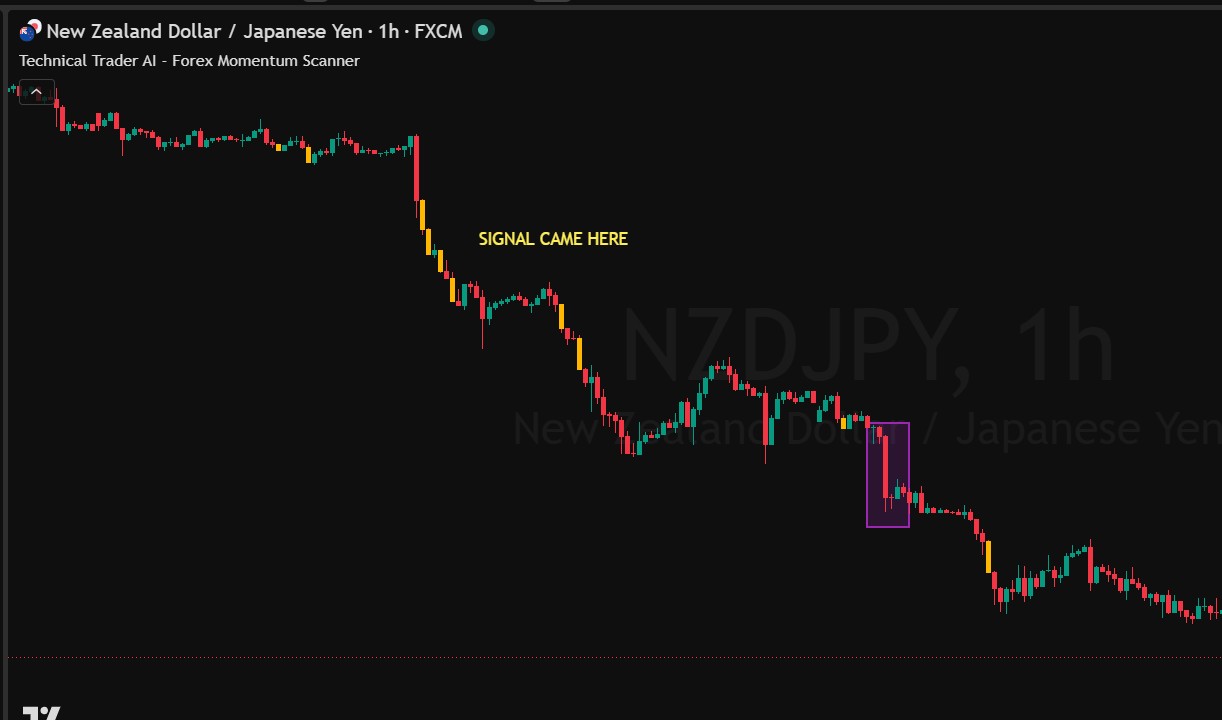
NZDJPY one-hour chart with a purple highlight around an uncoloured bearish candle that fails the algorithm signal-bar rule
04

The scanner finds the pair

A coloured candle is one entry method—not the only one

In the highlighted NZDJPY 1-hour example, the bearish candle has a tail, so the algorithm does not recolour it as a signal. That does not prevent a trader from evaluating a separate price-action entry.

Algorithmic entry

Blue candles mark qualifying bullish signal bars; yellow candles mark qualifying bearish signal bars. Assess the signal after its candle closes.

Your own entry method

Use pullbacks, support/resistance breaks, price action or higher-timeframe Fibonacci analysis in the direction identified by the scanner.

Keep the distinction clear

An uncoloured candle is not an algorithmic signal. It may still form part of your independent trading setup.

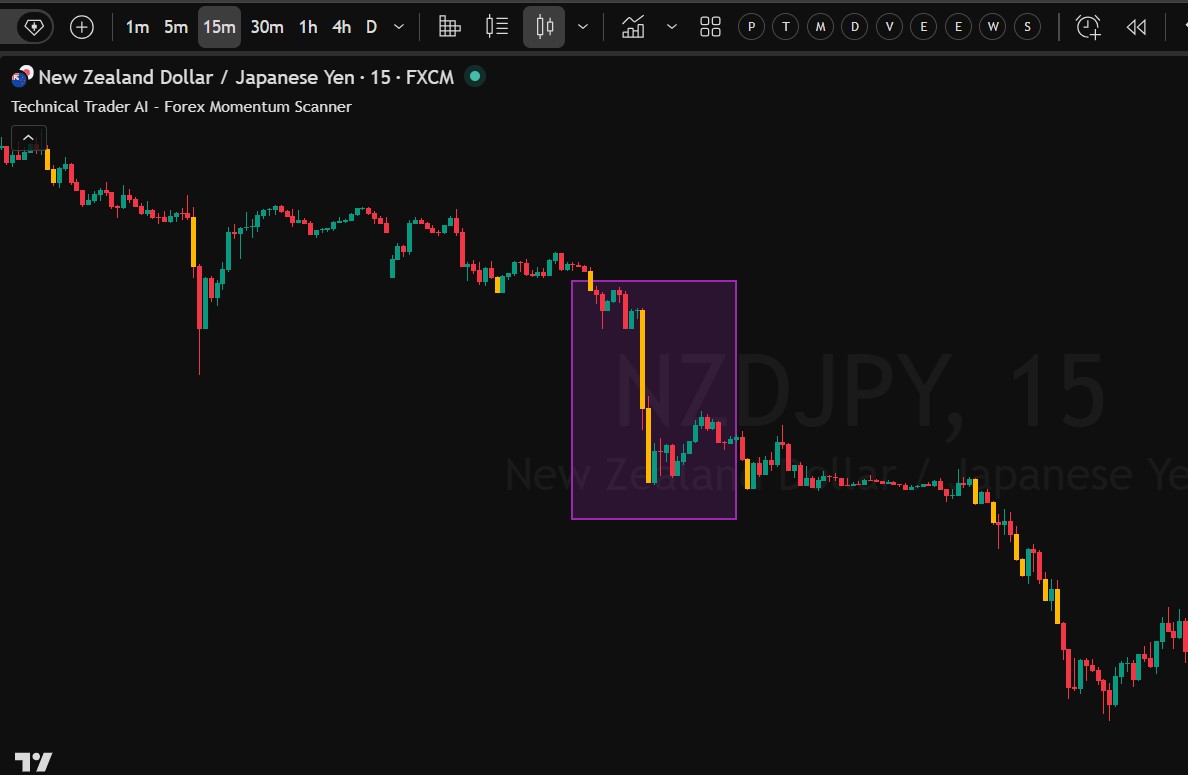
NZDJPY 15-minute chart showing yellow bearish algorithmic signal bars within the highlighted move
05

Separate scan from execution

Higher-timeframe view. Lower-timeframe entry.

The same NZDJPY move produces yellow signal bars on the 15-minute chart. Candles differ by timeframe: no signal on 1 hour does not mean there cannot be a qualifying signal on 15 minutes.

Swing view: 4H scan → 1H entry

Identify movement on the 4-hour scan, then assess the entry on the 1-hour chart.

Day trading: 1H scan → 15m entry

Use the 1-hour scan for more frequent opportunities and the 15-minute chart to assess entries.

Shorter-term scan: 15m

A 15-minute scan is also available. Scan and chart intervals are independent—use the three-day demo to test your preferred combination.

TradingView NZDUSD alert setup showing Technical Trader AI Bull, Bear and Any Breakout Entry conditions with an H1 scanner
06

Watch your selected pair

Let a signal-bar alert bring you back to the chart

After shortlisting a pair such as NZDUSD, create its alert from the indicator’s three-dot menu at the top-left of that chart. Set the intended entry interval; the scanner can remain on a higher timeframe.

Choose the signal condition

Technical Trader AI Bull Breakout Entry, Technical Trader AI Bear Breakout Entry, or Technical Trader AI Any Breakout Entry for either direction.

One selected pair—not the entire scanner

Repeat the setup for each pair you want to follow. These alerts do not notify you merely because a pair enters the top five.

Check the candle close

The screenshot shows Once per bar. An alert before the candle closes is not closed-candle confirmation; inspect the completed bar before using the algorithmic entry.

TradingView access guide

Get access and set up your scanner

Start with the full three-day demo. Try the timeframes and entry methods before deciding whether to subscribe.

  1. 01

    Share your TradingView username

    Submit your exact TradingView username with the demo request or paid subscription so access can be activated for the correct account.

  2. 02

    Look for the activation email

    Once our team grants access, we will email you. Open Indicators → Invite-only scripts in TradingView and select Technical Trader AI – Forex Momentum Scanner.

  3. 03

    Favourite it and choose your view

    Add the indicator to your chart and favourites. Select your scan timeframe in the inputs. Use mobile compact mode when you only want the rankings.

  4. 04

    Set alerts for the pairs you follow

    Open a shortlisted pair’s chart, choose the intended entry interval and create Bull, Bear or Any Breakout Entry alerts. Refer to the illustrated alert guide above.

First-load access issue

If TradingView shows ‘No access’ immediately after activation, close TradingView completely and reopen it. The first load can retain an older cached permission state.

Frequently asked questions

Everything you need before starting

What does the Forex Momentum Scanner do?

It automatically scans 28 forex pairs and ranks their directional movement on your chosen scan timeframe. Focus on the top five to find active pairs, then open their charts and assess an entry. It is a market-selection tool, not an automatic trading system.

Do I need to add 28 pairs to a watchlist?

No. The supported 28 forex pairs are included automatically. The full dashboard shows a broader ranked list; the top five are your starting shortlist. The mobile compact view keeps the display focused on rankings.

How are momentum and relative momentum different?

Momentum determines the ranking by directional movement on the scan timeframe. Green indicates bullish movement and red indicates bearish movement. Relative momentum is the percentage showing how close price is to its recent directional high or low. It is not a win probability, accuracy score or guaranteed return.

Why can the top-ranked pair have lower relative momentum?

A pair can remain the strongest mover over the scan timeframe while pulling back from its recent extreme. In the NZDUSD example, the H1 scanner ranks it first with momentum of -435, but relative momentum is 56%: it is still the leading bearish mover in that snapshot, not currently at its recent low.

What do the 70% and 50% relative momentum levels mean?

Above 70% generally indicates stronger trending conditions and price closer to its directional extreme. Near the recent high or low, price may be in breakout mode. Below 50%, the suggested workflow is to avoid an immediate entry and wait for a fresh setup. Neither threshold replaces chart analysis.

Which scan and entry timeframes should I use?

For a swing-trading view, use a 4-hour scan with a 1-hour entry chart. For day trading and more frequent opportunities, use a 1-hour scan with a 15-minute entry chart. A 15-minute scan is also available for shorter-term trading. Scan and chart timeframes are independent; test what suits you during the three-day demo.

Must I wait for a blue or yellow candle before every entry?

No. Blue candles are bullish algorithmic signal bars; yellow candles are bearish algorithmic signal bars. They are one entry method. You can also use your own price-action, pullback, support/resistance-break or higher-timeframe Fibonacci method in the scanner’s direction. When using algorithmic signals, assess the completed signal candle.

Why is there a signal on 15 minutes but not on 1 hour?

Each chart timeframe has its own candle structure. In the supplied NZDJPY example, the highlighted 1-hour candle has a tail and does not meet the algorithm’s signal-bar rule, so it is not recoloured. The 15-minute view shows qualifying yellow signal bars during the same move. An uncoloured candle can still be assessed independently using price action.

Can I use the scanner after the first breakout has passed?

Yes. The scanner can help you keep track of a leading pair during a pullback. Look for a fresh price-action setup or qualifying signal bar aligned with the scan instead of treating its rank as a reason to chase the move.

How do breakout signal alerts work?

Create alerts on each pair you want to follow. Choose Technical Trader AI Bull Breakout Entry, Technical Trader AI Bear Breakout Entry, or Technical Trader AI Any Breakout Entry, and set the intended entry interval. These are signal-bar alerts for that pair, not automatic alerts for every ranked pair or changes to the top five. The screenshot shows Once per bar; an alert before candle close is not closed-candle confirmation.

Where do I place the stop-loss and target?

For a large entry candle, use its low for a buy or its high for a sell. For a smaller candle, use the relevant swing low or swing high. The suggested risk-to-reward is 1:2, with position size based on the selected stop. This is a planning guideline, not a promise that the target will be reached.

Does the Momentum Scanner repaint?

No. Technical Trader AI’s Momentum Scanner is non-repainting. Use completed candles to confirm algorithmic entries. Rankings and relative momentum can still change as market conditions evolve; they are not fixed historical recommendations.

How can I find the best forex pairs to trade today?

Use the currency momentum scanner to shortlist the top five pairs moving on your chosen timeframe, check their relative momentum, and inspect the individual charts. There is no permanently best pair: suitability depends on the current setup and your method, and a high rank alone is not an entry signal.

How do I get access, and what does the demo include?

The free three-day demo includes all three premium indicators. Submit your exact TradingView username with your request. Once activated, you will receive an email and can find the tools under Indicators → Invite-only scripts. No credit card is required for the demo.

What if TradingView says No access after activation?

Close TradingView completely and reopen it. On first load, an older cached permission state can remain visible immediately after access is activated.

Can I try the scanner before subscribing?

Yes. Use all three demo days to test instruments, scan timeframes and entry methods, and subscribe only when satisfied. Pricing is on the website’s pricing section. Indicator subscriptions are non-refundable under the Refund & Cancellation Policy because the full indicator suite is available to try first.

Choose your access

Try all three premium indicators free for three days.

No credit card required.

Technical Trader AI provides software tools for market analysis and automation, not financial advice. Trading involves substantial risk, and no indicator or Expert Advisor guarantees results.