Follow the direction only when price and all three trend filters agree. Use the yellow trailing stop and volatility-based targets to plan the trade after the signal candle closes.
Test Trend Engine with all three premium indicators during the free three-day demo—no credit card required.
Primary marketXAUUSD / Gold
Recommended timeframe15 minutes
Entry confirmationAll 3 filters aligned
Trade managementTrailing stop + 3 targets
Product overview
Trend Engine helps traders separate a confirmed directional move from ordinary candle colour changes. Green candles indicate bullish direction and red candles indicate bearish direction, but a trade is considered only when all three proprietary filters agree at candle close.
The filter calculations study three different market parameters while keeping the underlying logic proprietary. Their practical purpose is simple: full green supports a bullish setup, full red supports a bearish setup, and mixed filters mean no trade.
How to use the indicator
A three-step trend-following method
The first three charts show one bearish XAUUSD signal from confirmation through trade management. The final chart explains how mixed filters help avoid false entries in a sideways market. Charts are historical examples and do not guarantee future results.
01
Step 1 · Confirm the signal
Enter only when candle direction and all three filters agree
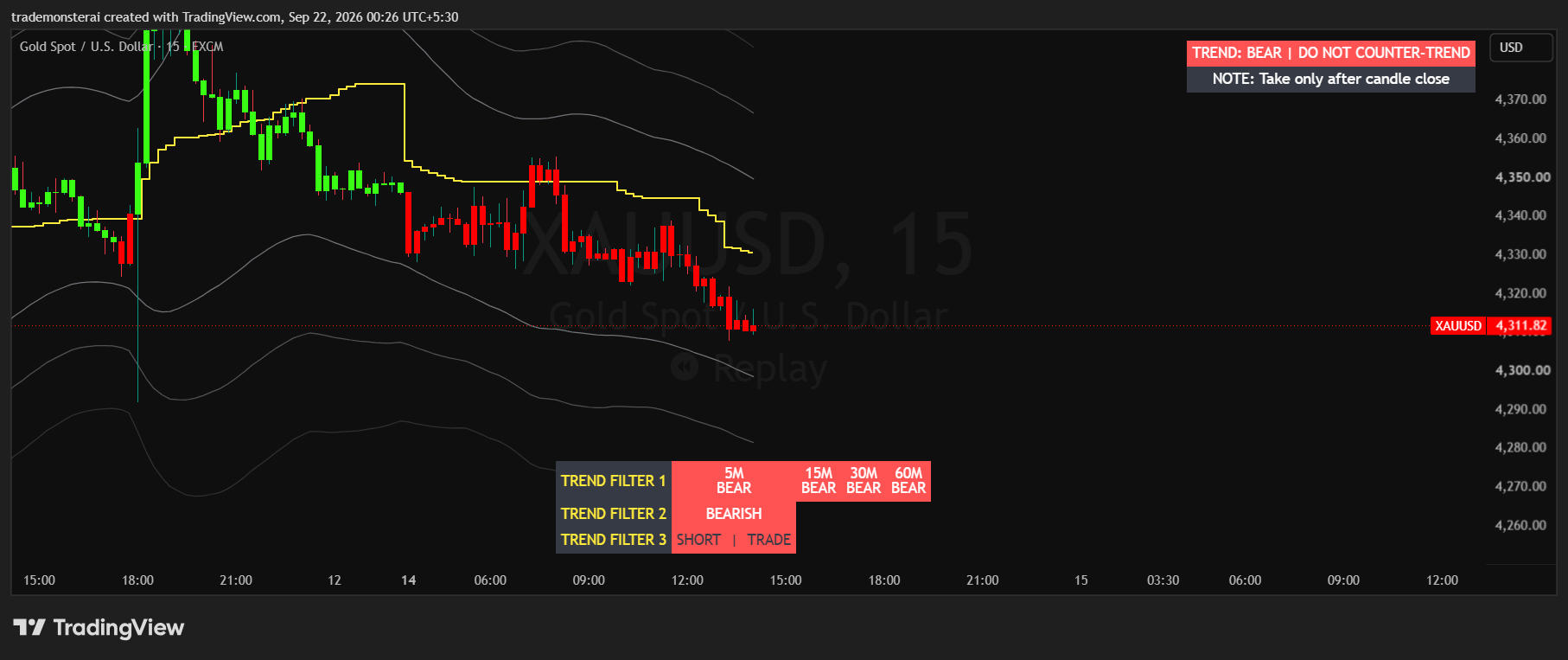
In this example, the signal candle closes red and all three proprietary filters show full bearish alignment. That completed candle provides the initial bearish confirmation. Candle colour without full filter agreement is not enough.
Bullish setup
Wait for a green candle to close while all three filters are fully green.
Bearish setup
Wait for a red candle to close while all three filters are fully red.
After entry
The filters may fluctuate later. Manage the open trade using the stop and target plan selected at entry.
02
Step 2 · Manage the open trade
Use the yellow trailing stop and volatility targets
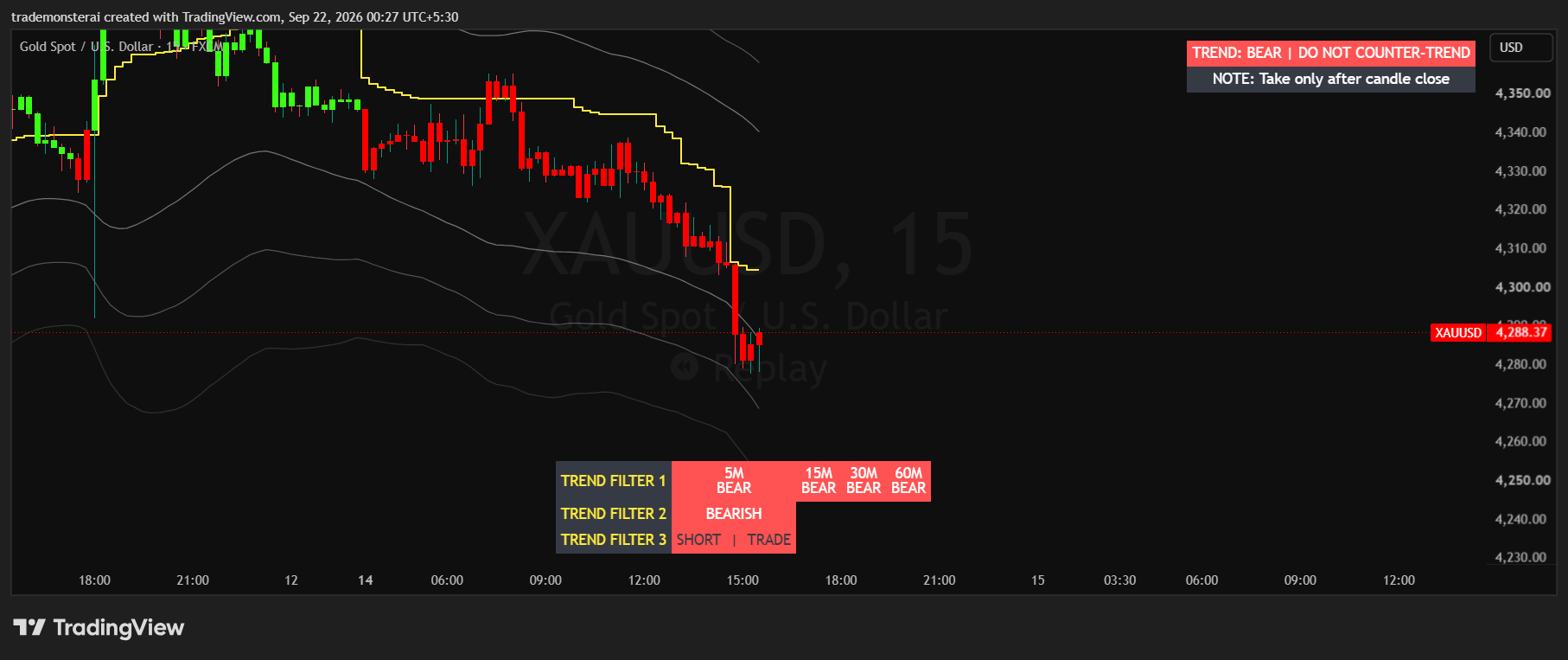
As the bearish move develops, the yellow stop-loss line trails above price. The three grey volatility lines below price provide progressive target references in the trend direction.
Yellow line
This is the trailing stop-loss reference. It adjusts as the trend develops.
Target 1
The first volatility line is the high-probability target.
When Target 1 is already reached
If the signal candle reaches or closes beyond the first line, use the second line as the planned target.
03
Step 3 · Choose trailing or set-and-forget
Keep trailing—or lock the original plan
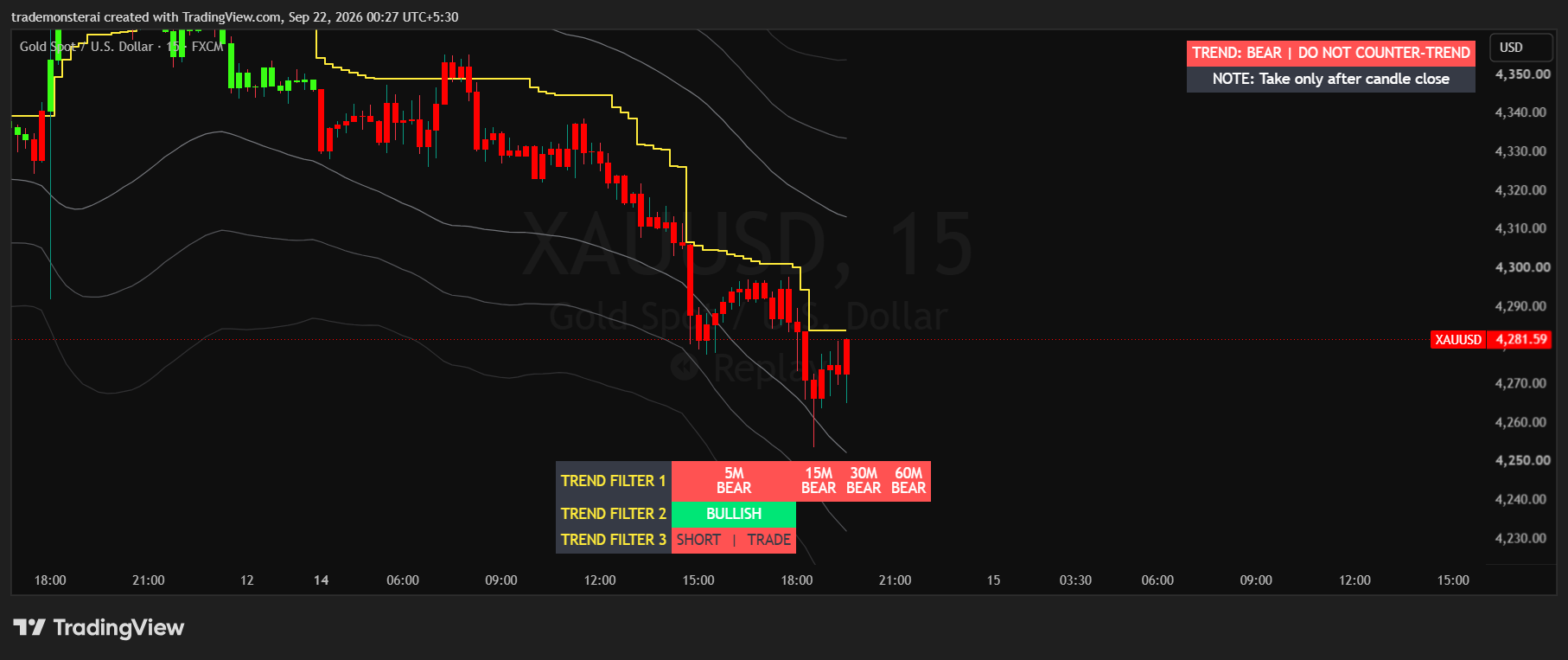
Later in the same move, price has travelled through the volatility levels while the yellow stop continues to trail. Traders can follow the moving stop and targets or record the initial levels at entry and use a fixed set-and-forget plan.
Trailing approach
Allow the yellow stop and volatility targets to update with the developing move.
Fixed approach
At entry, record the initial stop and selected target and keep them fixed for a set-and-forget plan.
Re-entry
Re-entry is for advanced traders managing scalp exits. It is not recommended for beginners and has no alert.
04
The main filter advantage
Mixed filters mean no trade
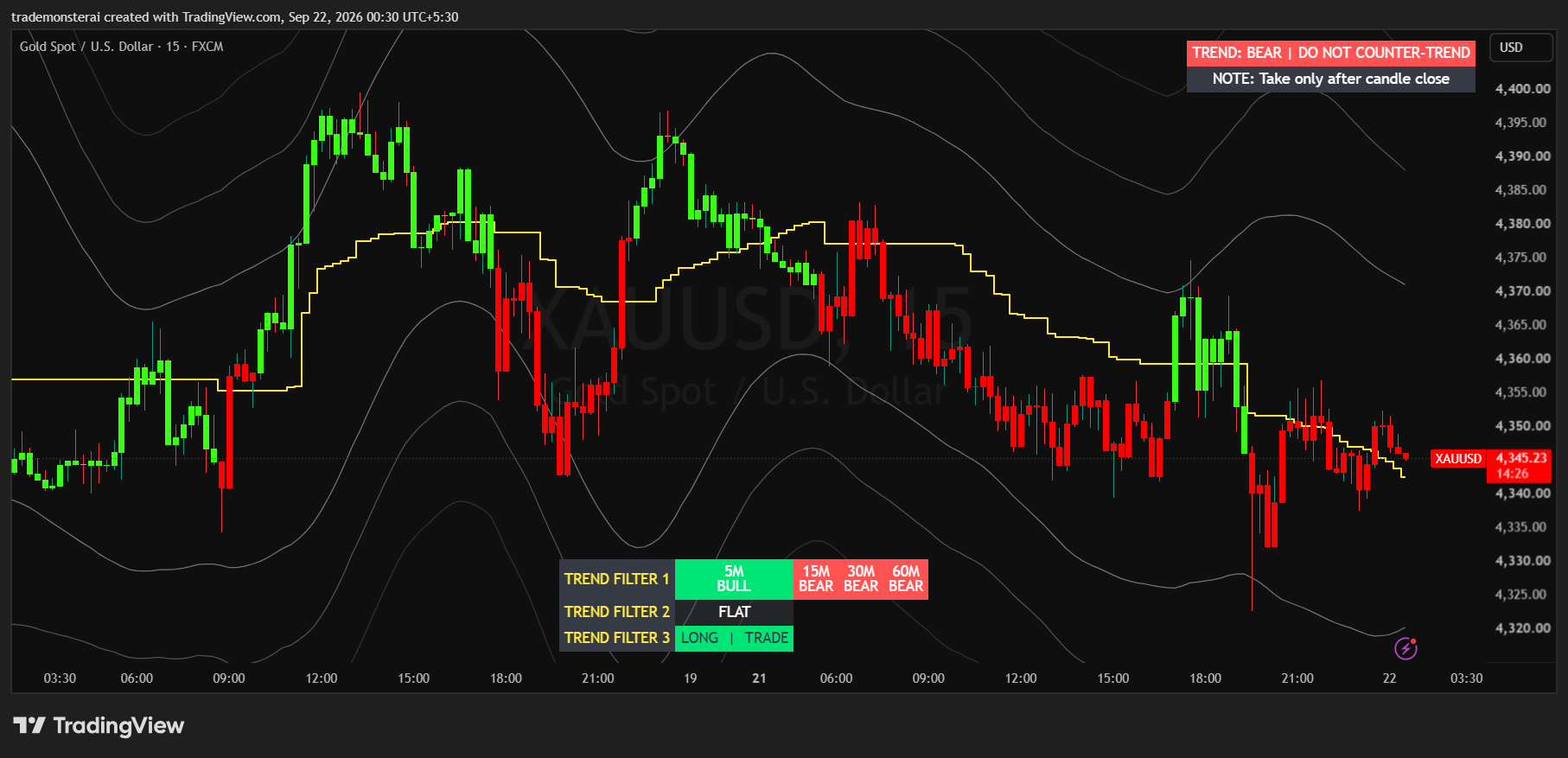
This sideways XAUUSD chart contains frequent green and red candle changes. The filters remain mixed or flat, preventing those candle colours from being treated as valid trend entries. Wait until all three filters become fully green or fully red.
Avoid mixed signals
Any disagreement among the three filters means the setup is unconfirmed.
Do not trade candle colour alone
Green and red candles show direction, but the three-filter agreement provides the entry qualification.
Wait for the first full alignment
Alerts are designed for the first complete green or red alignment, not later re-entries.
What each visual element means
Green candle: bullish direction
Red candle: bearish direction
Three filters: independent confirmation using proprietary parameters
Yellow line: trailing stop-loss reference
Three grey lines: volatility-based target levels
Simple operating rules
Use the 15-minute XAUUSD chart
Make the decision only after the candle closes
Trade only when all three filters match the candle direction
Avoid every mixed-filter condition
Choose either trailing management or fixed entry-time levels
TradingView access guide
From demo request to your first alert
Trend Engine is delivered through TradingView’s invite-only indicators. Use the demo to practise the three-filter method before subscribing.
01
Share your TradingView username
Enter your exact TradingView username in the demo or subscription form so access can be activated for the correct account.
02
Wait for the activation email
After access is enabled, you will receive an email. Open Indicators → Invite-only scripts in TradingView to find Trend Engine.
03
Add and favourite the indicator
Open it on your XAUUSD 15-minute chart and add it to favourites for faster access.
04
Create the first-alignment alert
Use the indicator’s three-dot menu to create bullish and bearish alerts. They trigger on the first full green or full red alignment; re-entry alerts are intentionally excluded.
First-load access issue
If TradingView shows ‘No access’ immediately after activation, close TradingView completely and reopen it. The first load can retain an older cached access state.
Frequently asked questions
Everything you need before starting
What is the Trend Engine designed for?
Trend Engine is a trend-following indicator for the XAUUSD 15-minute chart. It combines candle direction with three independent proprietary filters, a yellow trailing stop-loss and three volatility-based target lines.
What do the green and red candles mean?
Green candles show bullish direction and red candles show bearish direction. Candle colour alone is not an entry. Wait until all three filters agree at the close of the signal candle.
What confirms a valid bullish entry?
A bullish entry is considered only after a candle closes green while all three filters are fully green. If the filters are mixed, wait and do not enter.
What confirms a valid bearish entry?
A bearish entry is considered only after a candle closes red while all three filters are fully red. The decision is made after the candle closes.
What happens if the filters fluctuate after entry?
The three-filter alignment is required at the initial entry. After entry, later filter fluctuations are not used to manage the open trade. Manage it through the chosen stop-loss and target plan.
What is the yellow line?
The yellow line is the trailing stop-loss reference. It follows the trend as price moves. Traders who prefer a set-and-forget plan can record and fix the initial stop visible when the signal candle closes.
What are the three grey volatility lines?
They are volatility-based target levels plotted in the direction of the active trend. The levels can trail as volatility and price develop.
Which target should I use?
The first volatility line is the high-probability target. If the signal candle has already reached or closed beyond the first line, use the second line as the planned target. You can either follow the trailing levels or lock the initial target at entry.
When should I avoid a trade?
Avoid the setup whenever the three filters show mixed colours or conflicting states. This filter alignment is the indicator’s main method for reducing false trend entries during sideways markets.
Does the indicator alert every entry and re-entry?
No. The alert is intentionally triggered only the first time all three filters become fully green or fully red. Re-entry alerts are excluded.
Are re-entries recommended?
Re-entries are intended only for advanced traders who can manage scalp exits. They are not recommended for beginners, and the indicator does not issue re-entry alerts.
Does Trend Engine repaint?
No. Trend Engine is non-repainting. Entry decisions should still be made only after the signal candle has closed and the three filters are fully aligned.
How do I get TradingView access?
Submit your exact TradingView username with the demo request or subscription. After activation, you will receive an email and can find Trend Engine under Indicators → Invite-only scripts.
What if TradingView initially shows No access?
Close TradingView completely and reopen it. The first load can retain an older cached permission state immediately after access is activated.
Choose your access
Try all three premium indicators free for three days.
Technical Trader AI provides software tools for market analysis and automation, not financial advice. Trading involves substantial risk, and no indicator or Expert Advisor guarantees results.